


A switch may seem like one of the simplest components in an industrial control panel or a finished product. However, choosing the wrong one often becomes a problem when the project is already well underway: wiring needs to be modified, unexpected space constraints emerge, controls prove unintuitive, protection is inadequate, or a component works electrically but does not integrate properly into the product.
Choosing between an ON/OFF switch, a single-pole or double-pole switch, a changeover switch, a selector switch, a microswitch or an illuminated switch therefore requires more than comparing voltage, current and price.
You also need to consider the application, operating environment, frequency of use, panel layout and intended user interaction. For OEM manufacturers, assembly, production continuity, design and consistency with the equipment's visual identity are equally important.
Let's look at the criteria that can help you make the right choice before a small component becomes a design problem.
Unsure which component is right for your project?
Contents
- How to choose a switch based on its function
- Single-pole or double-pole switch: which should you choose?
- Switches, changeover switches and selector switches: what are the differences?
- When should you choose a microswitch?
- When is an illuminated switch the right choice?
- How to choose switches for industrial panels and equipment
- Rocker switch, push button or another control: ergonomics matter
- When a switch becomes part of product design
- From operating requirements to technical choices
- Technical choices must also work in production
- Mistakes to avoid when choosing switches
- Frequently Asked Questions
- Additional practical tips
- Glossary
- The right choice proves its value when the product is in use
How to choose a switch based on its function
The first mistake often lies in how the search begins. You look for a component with the right dimensions, check its voltage and current ratings, and then try to adapt it to your design.
A more effective approach starts with the intended function and involves defining a set of specifications:
- What should happen when the control is operated?
- Does it simply need to open and close a circuit?
- Does it need to remain in the selected position?
- Does it need to select between two functions?
- Does it need to switch between several operating states?
- Does it need to mechanically detect the position of a door or access panel?
On a professional coffee machine, for example, the main power control may require an ON/OFF switch, while other functions within the same machine may call for a changeover switch, selector switch or microswitch. The appropriate type therefore depends on the function it needs to perform, even within the same piece of equipment.
The same principle applies to an industrial control panel, where a switch may activate a particular function, or to an HVAC system, where a control may select different operating modes. In vending machines and automated equipment, the frequency of use may be one of the first parameters to assess.
In a home appliance, a selector switch may control different operating modes. In a lighting product, a single control may need to operate different circuits or functions.
Before looking for a component, define exactly what the circuit needs to do when the control is operated.
Single-pole or double-pole switch: which should you choose?
The difference between a single-pole and a double-pole switch lies in the number of poles operated simultaneously. A single-pole switch controls one pole, while a double-pole switch operates two poles through the same actuator.
The distinction may seem straightforward, but it affects wiring, space requirements, the number of terminals and the equipment's electrical configuration.
The question of when to use a double-pole switch should therefore be answered by examining the circuit diagram and the product's technical requirements, rather than the component's appearance.
When comparing switch specifications, the number of poles is often indicated alongside the number of throws using standard abbreviations. Understanding these helps you quickly identify the electrical configuration offered by each component:
- SPST: Single Pole Single Throw;
- SPDT: Single Pole Double Throw;
- DPST: Double Pole Single Throw;
- DPDT: Double Pole Double Throw.
These abbreviations help you establish whether a switch is compatible with the circuit's intended function before considering its dimensions, mounting method or appearance.
In a home appliance, limited space and the internal layout can make this choice particularly important. A component that does not match the circuit diagram may require changes to existing wiring or increase the number of components needed.
Single-pole and double-pole describe specific electrical configurations, rather than different levels of quality.
Switches, changeover switches and selector switches: what are the differences?
They may look similar, but they perform different functions.
An ON/OFF switch is used to open or close a circuit. A diverter switch routes a common contact between different paths. A bipolar and unipolar change-over switch is used when the application requires a choice between configurations defined by the circuit.
Confusing these functions can make a circuit unnecessarily complicated.
Consider a lighting product with two operating modes, or a home appliance in which a control needs to select different functions. Using several independent switches may take up additional panel space and make the interface less intuitive. Conversely, installing a multi-position selector when only ON and OFF are required introduces unnecessary complexity.
Define how many states the circuit needs to manage before deciding how many controls to include on the panel.
When should you choose a microswitch?
Not all switches are designed to be operated directly by the user.
A microswitch can detect the position of a door, lever, moving part or internal mechanism. In these applications, several parameters become particularly important: operating travel, actuation force, actuator position and movement repeatability.
Consider the door of a professional oven, the end-of-travel position of an industrial machine or a moving component inside a vending machine. If the actuation point is incorrectly defined, the mechanism may appear to have reached its intended position even though the electrical contact has not yet changed state.
This can lead to intermittent faults that are difficult to diagnose during maintenance.
When is an illuminated switch the right choice?
After operating a control, users often need immediate confirmation that a function is active.
On a coffee machine, an illuminated switch can indicate the equipment's main operating status. On an extractor hood or small household appliance, it can identify a selected function. In a lighting product, it can indicate the status of a circuit.
On an HVAC control panel, it can make an active function immediately recognisable, including during servicing. On medical equipment, the control and its visual indication must avoid ambiguity between the selected function and the device's actual operating status.
An illuminated switch combines the control and visual feedback in a single component. This can simplify the panel and create an immediate association between an action and its corresponding state.
However, the illumination must communicate something specific.
If the information needs to be visible from a distance or independently of the control's position, a separate indicator light may be more effective. If the control and the indicated state coincide, combining them can create a more compact interface.
Colour, brightness and light distribution must also remain clearly visible under actual operating conditions.
Integrated illumination is useful
when it removes uncertainty for the user.
How to choose switches for industrial panels and equipment
A component that performs correctly in laboratory tests may behave differently after several months of use. The reason is straightforward: a control panel operates in the same environment as the equipment in which it is installed.
For example:
- HoReCa equipment may expose controls to heat, humidity, steam, residues and frequent cleaning.
- Machine tools may expose switches to dust, oils, vibration and a high number of operating cycles.
- HVAC and refrigeration systems may be subject to condensation and temperature fluctuations.
- Vending machines installed in public spaces often operate unattended and experience continuous use.
- Outdoor and gardening equipment may be exposed to moisture, dust, water and temperature fluctuations. In these applications, the component must be assessed together with its mounting arrangement and the protection provided by the panel.
Applications involving frequent operation or particularly demanding conditions may also require anti-vandal solutions. Switches and push buttons designed for continuous, repeated operation can provide greater robustness in vending machines, HoReCa equipment and outdoor installations.
The same component may therefore perform very differently depending on where it is installed.
Before making your selection, check at least the following characteristics:
- Rated voltage and current;
- Type of electrical load;
- Electrical and mechanical life;
- Operating temperature;
- Frequency of operation;
- Materials and finishes;
- Exposure to liquids, dust or cleaning agents;
- IP rating required by the application;
- Panel mounting system;
- Ease of wiring and replacement.
An underspecified component may wear out prematurely, while an oversized one may occupy unnecessary space and increase costs without delivering any practical benefit.
Identify the configuration best suited to your project.
Rocker switch, push button or another control: ergonomics matter
A panel can be electrically correct yet remain difficult to use. This often happens when switches, indicator lights and symbols are selected independently, without considering how people will interact with the product.
A rocker switch usually provides a clear indication of its selected position and may be suitable for maintained functions. A momentary push button operates differently, while a selector switch allows users to distinguish between several operating modes.
On an industrial control panel, operators need to identify the correct control quickly while working on the machine. On medical equipment, the position, symbols and visual feedback must make it easy to distinguish between functions that must not be confused. On HoReCa equipment, the panel should remain intuitive even for someone using the appliance for the first time.
Dimensions, operating travel, actuation force, positioning, symbols and illuminated feedback all contribute to usability.
This also establishes a direct connection with interface design: indicator lights and controls should follow a consistent logic. Choosing the right components reduces the time needed to identify the appropriate control and understand which operating state is active.
When a switch becomes part of product design
For many years, switches and indicator lights were treated as purely functional components. In OEM products, this approach can make it difficult to distinguish between equipment offering similar technical performance.
Button shape, finish, colour, illumination and integration into the front panel all influence the overall impression of a product.
This is particularly evident in HoReCa equipment. Two professional machines may have comparable functional architectures, but an interface that is consistent with the machine's design can convey a stronger sense of quality.
The same principle applies to gardening and outdoor equipment, where switches, colours and illuminated indicators can help make an entire product family recognisable. It also applies to domestic lighting products, where controls need to integrate into equipment whose appearance often plays an important role.
Problems arise when differentiation is considered too late. Once the panel layout, mounting holes and wiring have been finalised, customisation options become more limited.
A standard component may perform its electrical function perfectly without necessarily being the most suitable choice for the product's visual identity.
OEM manufacturers should therefore define the following at an early stage:
- Control geometry;
- Colour and finish;
- Any required illumination;
- Symbols;
- Mounting method;
- Consistency with indicator lights and other interface elements.
Consistency across components, finishes and visual elements enhances perceived quality and makes the product more recognisable.
How to differentiate your brand through controls and indicators
Switches and indicator lights may be small, but they often occupy one of the most visible and frequently used areas of a product. If they are selected only towards the end of development, the result may be a technically sound panel that looks very similar to those found on competing equipment.
Differentiation can begin with these components. Switch shapes and finishes, colours, symbols, backlighting and illuminated indicators can follow a common visual language that remains recognisable across the entire product range.
On professional HoReCa equipment, this may involve coordinating controls and indicator lights with the front panel. On HVAC equipment, industrial control panels and machine tools, a consistent visual approach helps users distinguish between functions and operating states.
In home appliances, lighting products and gardening equipment, where design has a greater influence on how a product is perceived, the same elements can contribute directly to brand recognition.
There is no need to customise every component. Defining a small number of distinctive elements and using them consistently across different models may be more effective, with adaptations where functions or operating conditions change.
Design is also expressed through the way a product is switched on, controlled and communicates with its users.
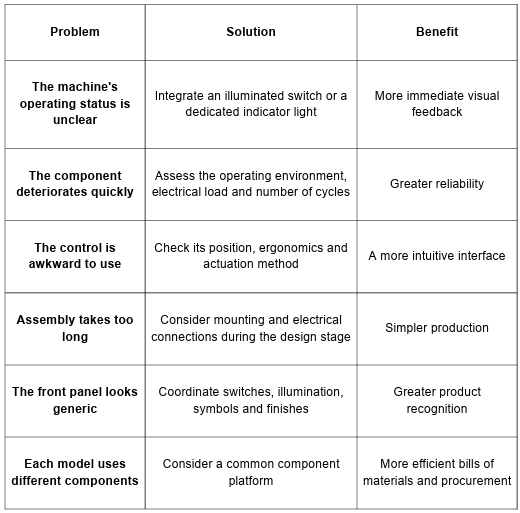
From operating requirements to technical choices
When several requirements need to be considered at the same time, this summary can help you identify where to focus your assessment.
Technical choices must also work in production
A switch must fit the intended mounting hole and be easy to install, connect, inspect and replace using simple, repeatable procedures.
Difficult-to-access terminals slow down assembly. Tolerances that are unsuitable for the panel can cause mounting problems. Too many variants complicate purchasing, bills of materials and spare parts management.
When moving from prototype to production, these issues have a direct impact on costs. For a range comprising several models, it may be worth assessing whether the same control architecture can be used across different products, with only a few elements changed.
At this stage, SLIM can support designers and engineering teams in checking electrical requirements, panel integration and production constraints before the final component is selected.
Reducing manufacturing complexity is part of the component choice
An early assessment with the switch manufacturer helps verify that the component's geometry, mounting method and electrical connections are compatible with the assembly process before the design is finalised.
The ideal component performs reliably within the product and can be consistently installed throughout the entire production run.
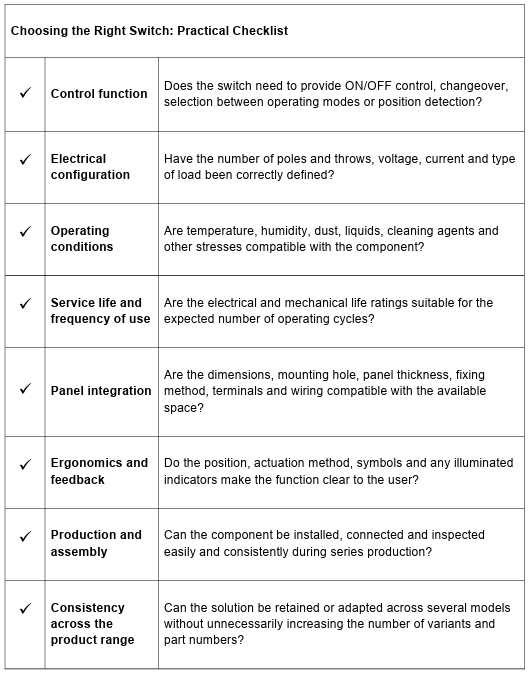
Mistakes to avoid when choosing switches
Choosing a Switch Based Only on Voltage and Current
These are essential parameters, but they do not describe the entire application. The operating environment, type of load, frequency of use and mounting method can be equally important.
Confusing Single-Pole and Double-Pole Switches, Changeover Switches and Selector Switches
Components that look similar may control a circuit in very different ways. The circuit diagram should guide component selection.
Installing an Illuminated Switch Without Defining What It Indicates
Illumination that has no immediately recognisable meaning adds visual information without improving the interface.
Assessing the IP Rating Without Considering Mounting
The protection provided by an installed component also depends on its integration into the panel, the specified seals and the actual exposure conditions.
Ignoring the Number of Operating Cycles
A control operated only a few times a day and one used continuously throughout a working shift are exposed to very different levels of stress.
Designing the Front Panel Before Choosing the Switch
Mounting holes, panel thickness, electrical connections and the space available behind the panel can quickly limit the available options.
Comparing Components Solely on Unit Price
Saving a few cents on a component may offer little benefit if it increases assembly time, leads to replacements or makes the product range more complicated to manage.
Frequently Asked Questions
What Is the Difference Between a Single-Pole and a Double-Pole Switch?
A single-pole switch controls one pole, while a double-pole switch operates two poles simultaneously. The choice depends on the circuit diagram and the equipment's technical requirements.
When Should You Use a Double-Pole Switch?
A double-pole switch is used when the application requires two poles to be operated simultaneously. This requirement must be checked against the circuit design and the equipment's technical specifications.
What Is the Difference Between an ON/OFF Switch and a Changeover Switch?
An ON/OFF switch opens or closes a circuit. A changeover switch connects a common contact to one of two available paths.
What Is the Difference Between a Changeover Switch and a Selector Switch?
A changeover switch selects between two paths. A selector switch is used for selection arrangements defined by the circuit, which may involve several states or contacts.
When Is an Illuminated Switch Useful?
When it is helpful to combine a control and a visual indication of its status in the same location. However, the illumination must convey information that is clear to the user.
How Do You Choose a Switch for an Industrial Control Panel?
Consider its electrical function, type of load, frequency of use, operating environment, required protection, mounting method, wiring and ergonomics. OEM applications also require an assessment of assembly and production continuity.
Additional practical tips
Test the Control on the Complete Prototype
A technical datasheet cannot show how a component will feel once installed. Assess actuation force, accessibility, visibility and feedback with the complete panel assembled.
Consider Panel Tolerances
Panel thickness, mounting-hole dimensions, paint finishes and manufacturing processes can affect how securely a component is mounted. Check these factors together with the selected switch before moving into full production.
Reduce the Number of Variants Where Possible
Building a product family around a limited number of shared component formats simplifies procurement, assembly and spare parts management.
Establish a Consistent Approach to Illumination and Controls
If illuminated switches and separate indicator lights are used on the same panel, their colours and meanings should follow consistent rules. The same colour should not communicate different conditions without a clear reason.
Consider Future Developments Across the Product Range
A new model may require a second pole, an additional switch position or different illuminated feedback. Anticipating these possibilities can help avoid redesigning the panel architecture every time the product range evolves.
Glossary
SPST – Single Pole Single Throw
A configuration with one pole and a single switching path. It is commonly used for straightforward ON/OFF functions.
SPDT – Single Pole Double Throw
A configuration in which one pole can be connected alternately to two different paths. It is associated with changeover and selection functions.
DPST – Double Pole Single Throw
A configuration in which two poles are opened or closed simultaneously using the same actuator.
DPDT – Double Pole Double Throw
A configuration with two poles, each of which can switch between two paths, operated by the same mechanism.
Mechanical and Electrical Life
Mechanical life indicates the number of operating cycles the mechanism can withstand under specified conditions. Electrical life refers to the number of cycles performed while switching the specified electrical load.
The right choice proves its value when the product is in use
A switch occupies very little space on a panel, but it can affect wiring, reliability, assembly, usability and how the entire product is perceived. It is therefore worth selecting the component while the circuit and interface are still being defined.
From an industrial automation panel to HoReCa equipment, from an HVAC system to an outdoor application, the selection process should always begin with the actual conditions in which the control will operate.
Electrical function, operating environment, frequency of use and panel integration create different requirements, even when components look very similar from the outside.
When the control is visible, its shape, finish and illumination also contribute to the product's identity. A seemingly small design decision can help distinguish a consistently designed product range from an assortment of unrelated components.
Are you selecting switches for a new control panel
or OEM product range?