


If you want to learn how to design clear, intuitive and reliable user interfaces with indicator lights, explore our comprehensive guide to user interface design.
When designing a machine's control panel, you may need three separate indicator lights: one to show that the machine is ready, another to indicate that a cycle is in progress, and a third to signal a fault. Three light points that must be positioned, connected and made easy to recognise.
But what happens when the available space becomes limited or the number of functions to communicate increases?
RGB indicator lights allow different colours to be displayed through a single light point, communicating multiple operating states. They are worth considering when designing industrial equipment, professional machines, HVAC systems, home appliances and OEM products.
To select the most suitable component, designers need to consider the number of states to communicate, signal visibility, electronic requirements and integration into the product.
RGB technology can be used in compact indicators, panel-mounted indicator lights and micro-spotlights designed to illuminate specific functional areas. Each solution addresses different design requirements.
Are you designing a new illuminated interface?
Table of Contents
- How to communicate multiple machine states with a single RGB indicator
- Reducing the number of indicators without compromising readability
- Making equipment status easy to understand through colour
- When RGB light signalling contributes to product design
- Integrating light and signalling into complex spaces and geometries
- Which RGB solution should you choose? Three SLIM options
- When to choose an RGB LED and when a bi-colour LED is enough
- Selecting and integrating an RGB indicator light
- Frequently Asked Questions about RGB light indicators
- Additional Practical Tips
- Glossary
- More information, better-designed light signalling
How to communicate multiple machine states with a single RGB indicator
A single-colour indicator normally communicates one condition through a predefined colour. If a machine needs to display several operating states, multiple light points may be required. RGB LED technology offers an alternative. The component contains three light-emitting channels: red, green and blue. By activating them individually or in combination, the electronics can produce different colours.
For example, the same indicator can be used to communicate:
- Green: machine ready;
- Blue: specific function or operating mode active;
- Yellow: standby or waiting phase;
- Red: condition requiring attention.
These are examples of a possible signalling scheme. The manufacturer must define the meaning of each colour, taking account of the applicable conventions and standards. The benefit becomes clear when different conditions are mutually exclusive and can be communicated through the same light point.
How to control the colour?
In the SLIM RGB indicators and micro-spotlights described by the technical team, the colour is controlled by the equipment's electronic circuit board. The connection consists of one common terminal and three channels dedicated to the primary colours.
The manufacturer's control system therefore determines which channels to activate and, where required, how to combine them. This means that selecting an RGB indicator must be coordinated with the electronic design. Voltage, connections, channel control and the required colour output all need to be checked.
A single light point can communicate different states, provided that each colour has a clearly defined function.
Reducing the number of indicators without compromising readability
Every component takes up space on a compact control panel. Increasing the number of indicator lights can affect mounting holes, wiring arrangements and the positioning of controls. When several pieces of information can share the same light point, an RGB LED indicator offers the possibility of a simpler panel layout.
Consider an HVAC unit that needs to display different operating modes, or a measuring instrument where colour can help users quickly identify its operating status.
On an automated machine, a multicolour indicator can make different process stages recognisable without requiring a dedicated light for each one. This flexibility also benefits OEM product development. If a new model introduces an additional function, an RGB light source can offer greater flexibility than a single-colour indicator, provided that the electronics and interface signalling scheme are designed accordingly.
However, compactness still requires careful consideration. If two conditions need to be displayed simultaneously, a single RGB indicator may not be sufficient.
Making equipment status easy to understand through colour
The ability to use multiple colours creates new opportunities, but it also introduces a design responsibility: establishing a consistent signalling scheme.
On a professional coffee machine, colour can accompany different operating phases or indicate that attention is required. In a vending machine, it can help users recognise the equipment's status. On industrial control panels, it can make operating conditions easier to identify.
On medical equipment, the relationship between colour, meaning and the device's actual status must be assessed particularly carefully, in accordance with the applicable requirements. For industrial control panels, colour selection must also take relevant standards into account.
The IEC 60204-1 standard, covering the electrical equipment of machines, provides a reference for the design of control and signalling devices. Designers must therefore check that the colours used are consistent with their intended functions and the applicable requirements.
To design an effective signalling system, you need to establish:
- Which operating states must be communicated;
- Which information takes priority;
- Which colours should represent the different conditions;
- From what distance the signal must remain visible;
- Whether colour alone is sufficient or additional visual elements are needed.
Brightness, light diffusion and the position of the light point also affect the result. An indicator that is clearly visible in the laboratory may be less readable under strong ambient lighting, near reflective surfaces or when viewed from an angle.
Effective light signalling allows users to recognise the machine's status without having to interpret it.
When RGB light signalling contributes to product design
Switches, indicator lights and illuminated elements often occupy some of the most visible areas of equipment. Their shape, arrangement and colour output influence how the product is perceived.
Integration requirements vary according to the application sector:
- HoReCa and Home Appliances: colour can accompany the operation of the equipment and contribute to a consistent user interface.
- Lighting and Home Automation: a compact indicator can be integrated into the control panel while maintaining a visual language that complements the rest of the product.
- Gardening and Outdoor Equipment: carefully designed light signalling can help make an entire product family more recognisable.
- OEM Projects: shared criteria for colours, brightness, finishes and indicator positioning help maintain visual consistency across models with different functions.
Customisation can also extend to the component itself. For projects with specific requirements, SLIM can work with the customer's engineering team to assess lenses, connections and other characteristics, depending on technical feasibility and the quantities involved.
Integrating light and signalling into complex spaces and geometries
The position of the light point is one of the decisions that has the greatest influence on the design.
A light source located inside a machine requires a suitable optical system to make the light visible. An indicator mounted directly on the front panel must be compatible with the mounting hole, panel thickness and fixing method.
When the application requires illumination of an operating area, the distance from the surface and the distribution of light become particularly important.
Consider the dispensing area of a water dispenser. A small indicator on the front panel can communicate the equipment's status, while a micro-spotlight can illuminate the dispensing area and change colour according to the operating phase.
These two components perform different functions, and this distinction must be considered from the early stages of development. Involving the component manufacturer before finalising the geometry, power supply and connections can therefore help prevent integration problems.
Product geometry, the intended lighting function
and electronic requirements
guide the selection of the RGB component.
Which RGB solution should you choose? Three SLIM options
The three SLIM solutions currently available address different design requirements.
TB/RGB Signalling Unit
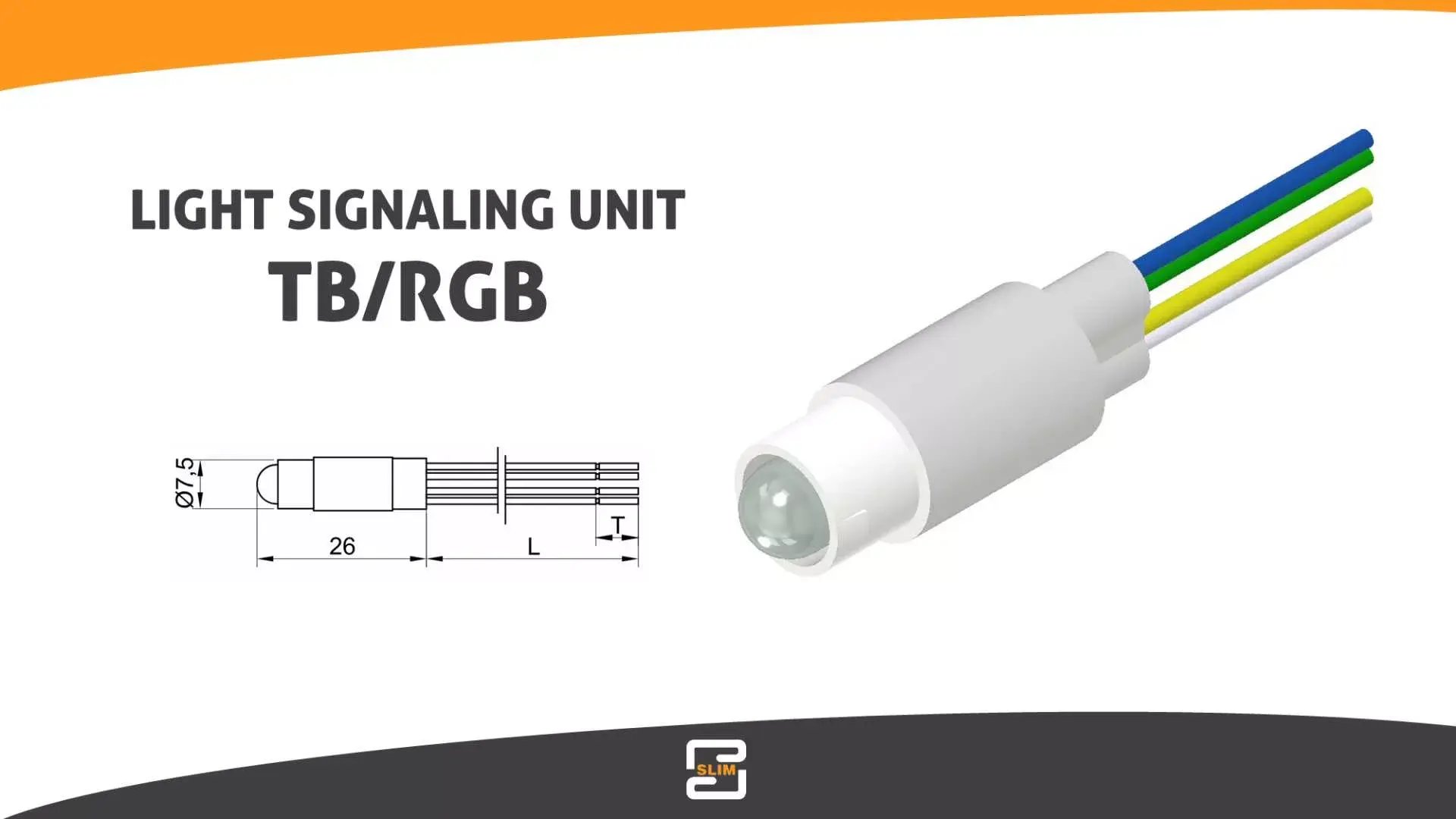
A compact RGB light source designed for integration into equipment and combination with the lens specified for the project. It is suitable for communicating multiple operating states through a single light point while maintaining flexibility in the integration process.
The SLIM solution is available with different rated voltages and PVC cable connections.
TB010 RGB Indicator Light
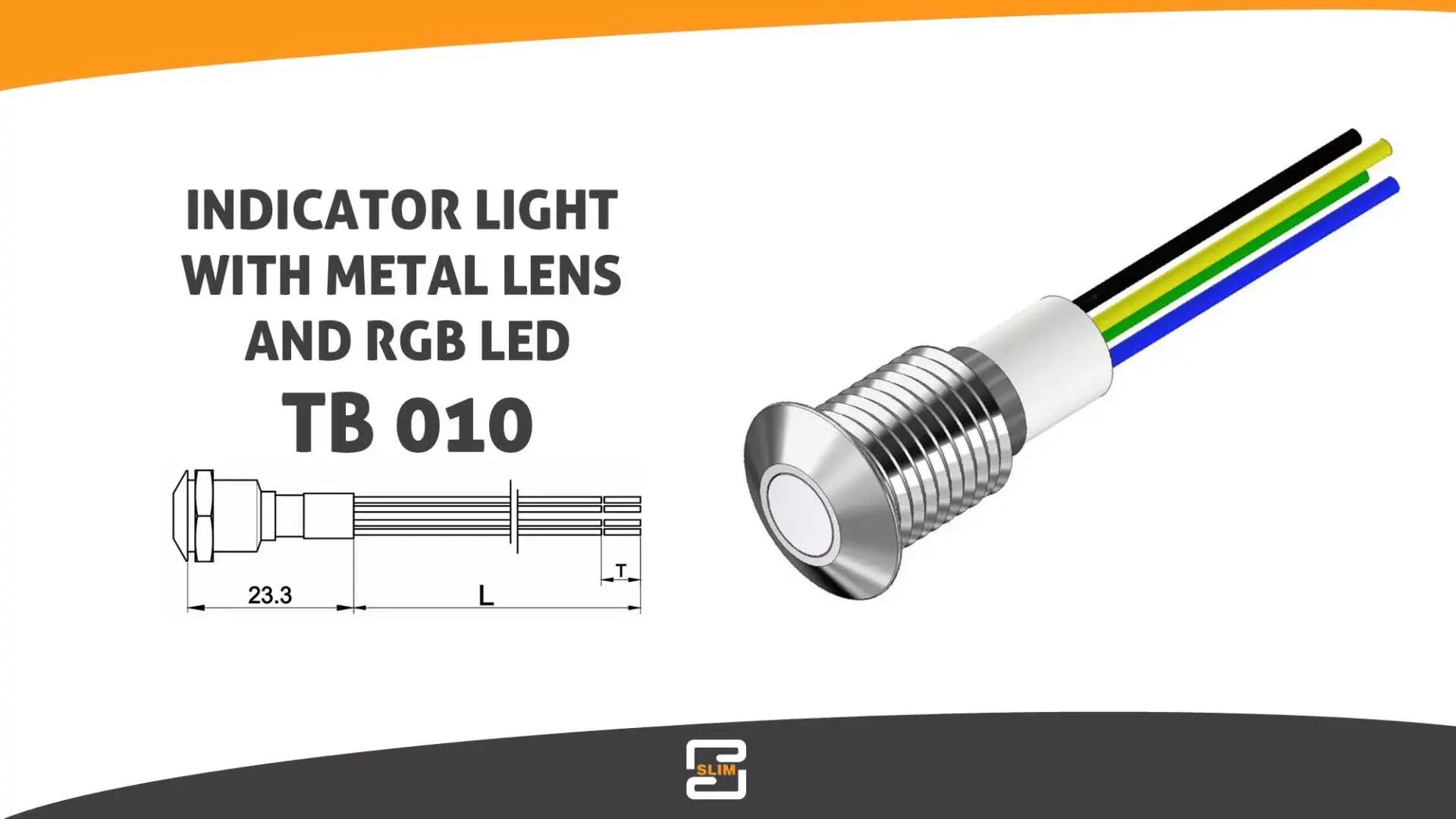
A panel-mounted indicator designed for a 10 mm mounting hole, featuring a chrome-plated brass lens body and a visible RGB LED.
It provides a compact signalling point and robust construction, making it particularly suitable for professional coffee machines and HoReCa equipment. For applications involving impacts, vibration or specific environmental conditions, the actual technical requirements must be checked against the component's specifications.
RGB Micro-Spotlight
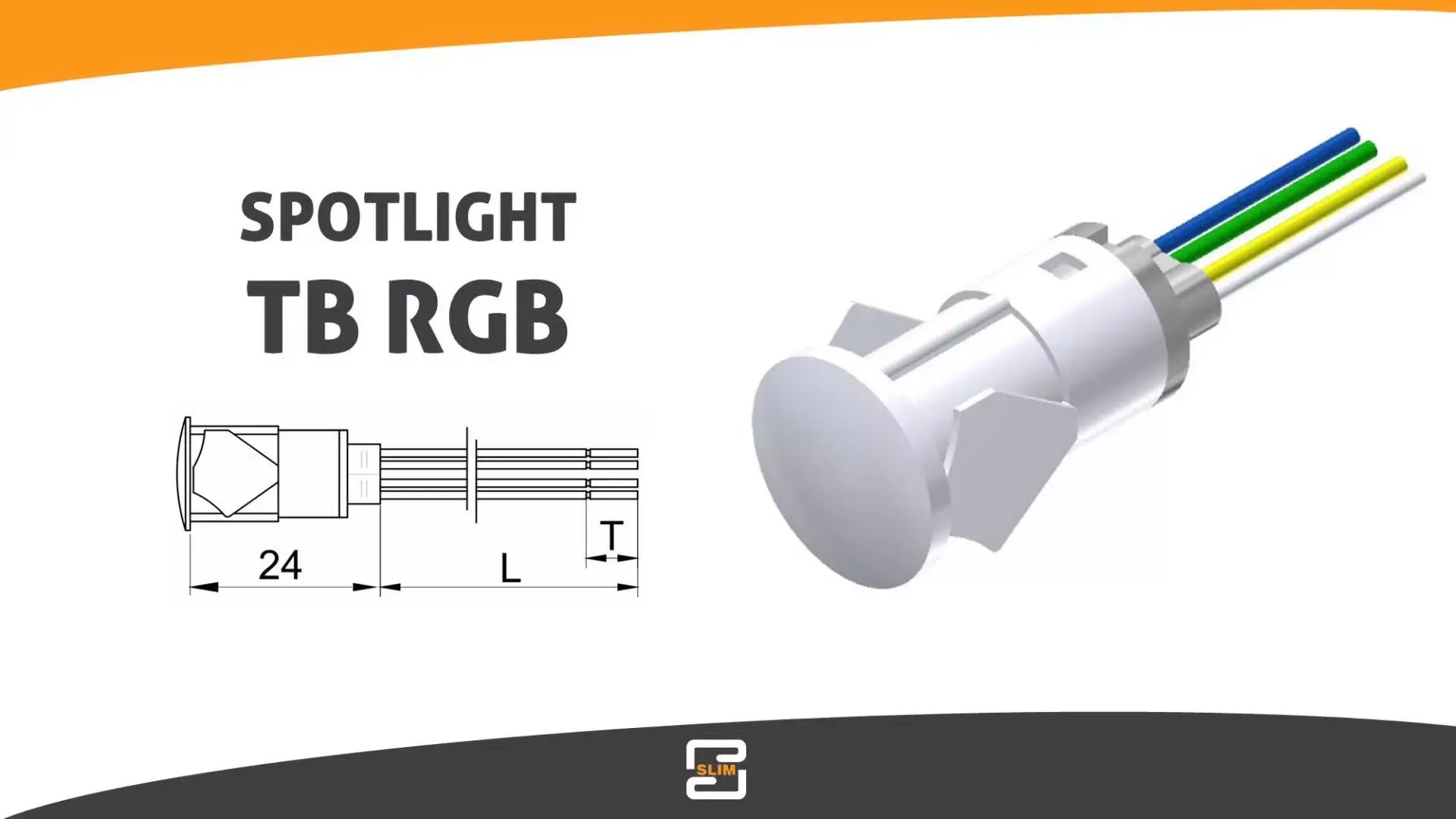
A high-intensity lighting solution designed for a 12–13 mm mounting hole, operating at 12 V DC and featuring a slim 2.5 mm head.
It is suitable for illuminating small, defined areas, such as the dispensing zones of coffee machines, vending machines, dispensers and home appliances.
From design challenges to technical solutions
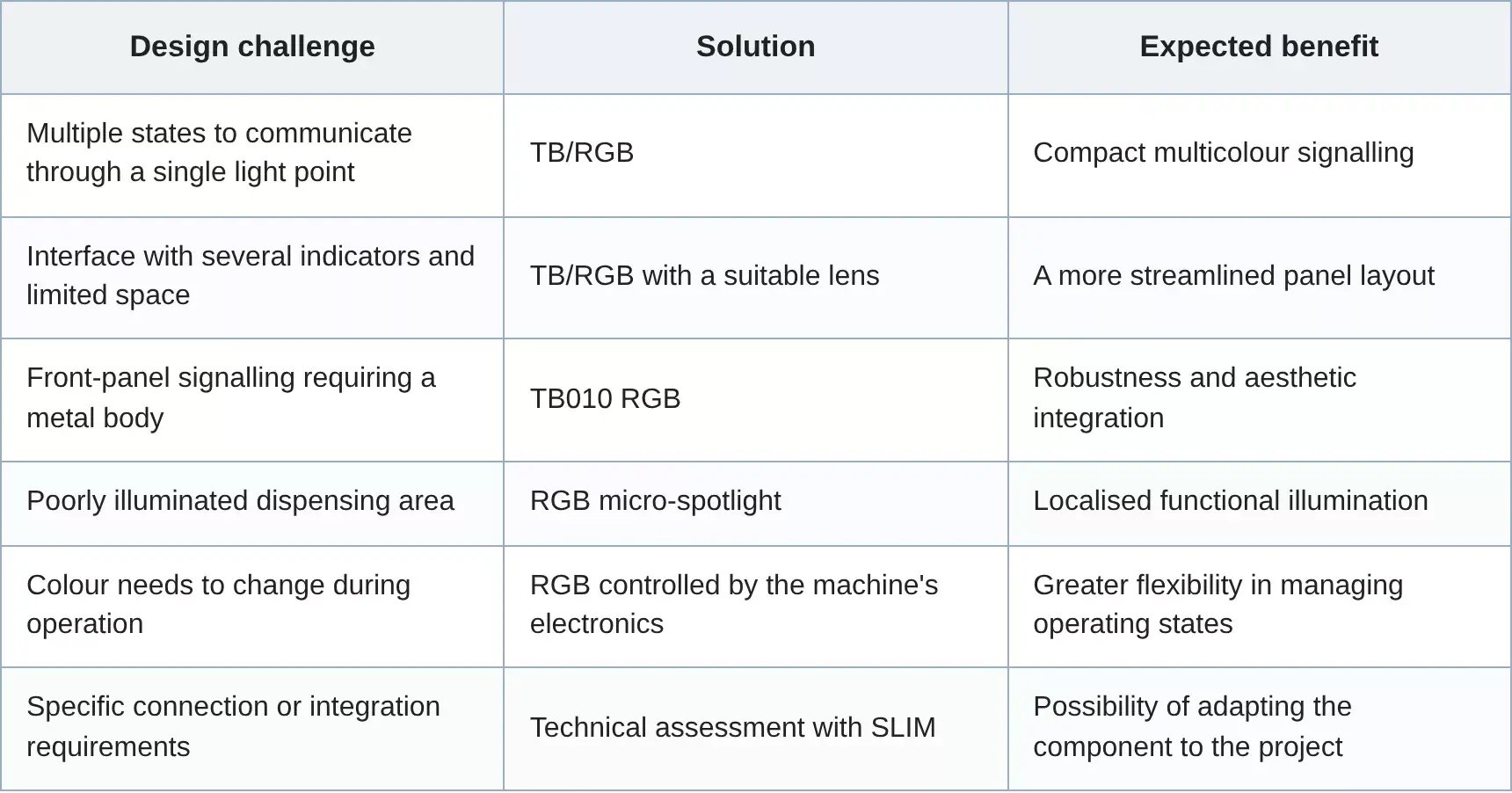
Each RGB solution addresses specific design requirements. The signalling unit, the metal-bodied panel indicator and the micro-spotlight offer different characteristics that designers need to assess according to the intended function and operating conditions.
The table compares the main applications and their expected benefits.
Have you already defined your light signalling requirements?
When to choose an RGB LED and when a bi-colour LED is enough
Not every application requires the full flexibility of an RGB light source. If the interface only needs to communicate two states, such as ready and fault, a bi-colour LED may be sufficient. This solution can be simpler and more cost-effective.
RGB becomes particularly useful when a project requires three or more colours, specific colour combinations or the possibility of using the same component in different product configurations.
The selection process must also take electrical connections, channel control and the overall cost of the solution into account.
The number of colours required from an indicator is a design requirement to define, rather than a feature to maximise.
Selecting and integrating an RGB indicator light
Before selecting a component, the following checks can help clarify the application's requirements and identify potential issues.
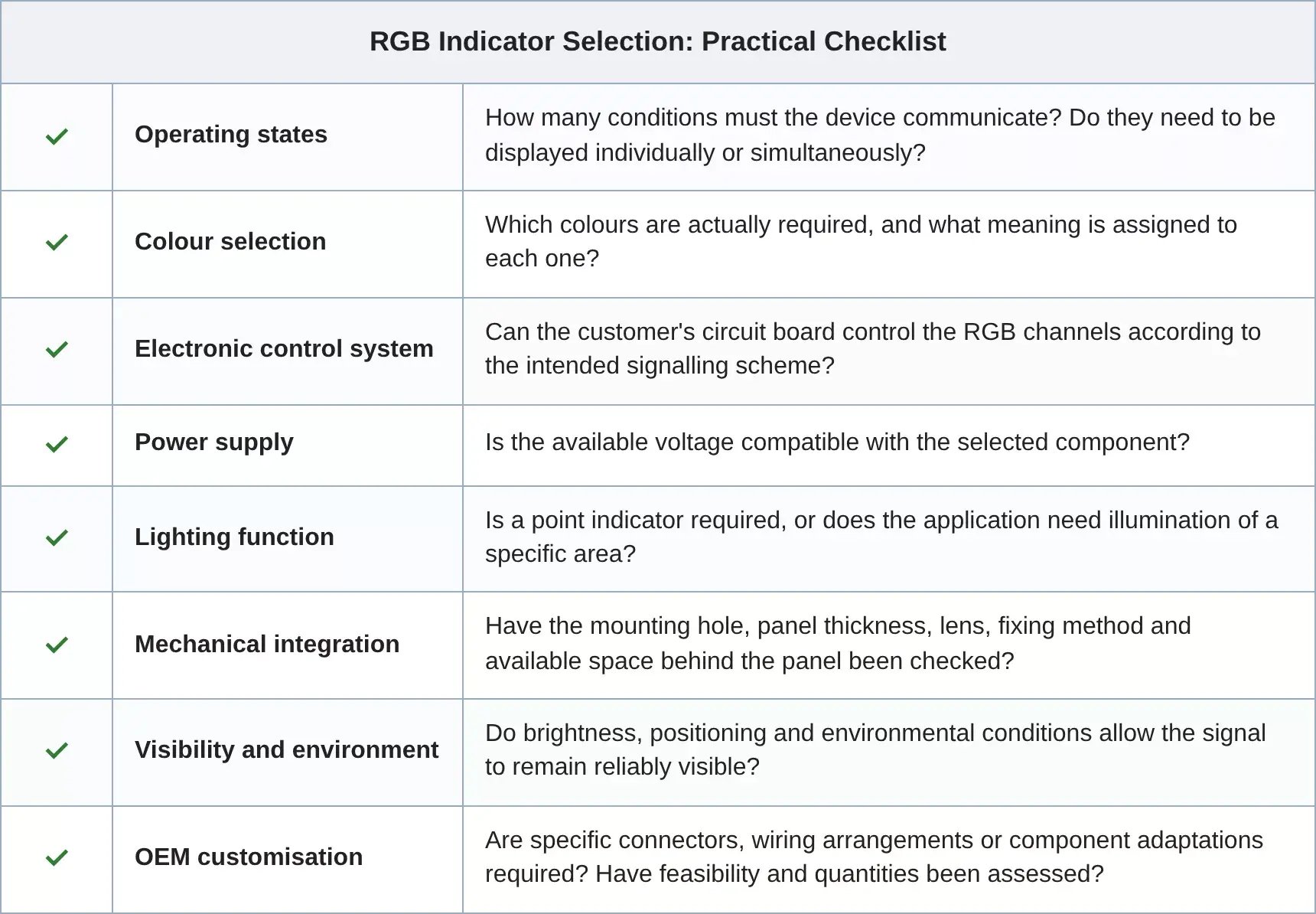
Frequently Asked Questions about RGB light indicators
What Is an RGB Indicator Light?
An RGB indicator light is a light-emitting component that uses red, green and blue channels to generate different colours. It can communicate multiple operating states through a single signalling point.
How Does an RGB LED Indicator Change Colour?
The colour depends on the activation and combination of the RGB channels. In the SLIM products described here, the equipment's electronics control the colour output.
Can One RGB Indicator Replace Three Separate Indicator Lights?
Yes, provided that the operating states are mutually exclusive and can be displayed through the same light point. If several pieces of information need to be visible simultaneously, a different signalling arrangement may be required.
What Is the Difference Between the TB/RGB and TB010 RGB?
The TB/RGB is a compact light source designed to be combined with a lens and integrated into the product. The TB010 RGB is a complete panel-mounted indicator with a chrome-plated metal body and a 10 mm mounting hole.
When Should You Use an RGB Micro-Spotlight?
An RGB micro-spotlight is useful when a project requires a small area to be illuminated and its colour to change, for example in the dispensing zone of a coffee machine or dispenser.
Can SLIM RGB Solutions Be Customised?
SLIM can assess adaptations to connections, connectors and component characteristics. Feasibility depends on technical requirements, production quantities and any associated tooling costs.
Additional Practical Tips
Check the Colours on the Actual Prototype
The perceived colour can vary depending on the lens, the material through which the light passes and environmental conditions. Assess the result with the complete panel assembled.
Consider Users and Visibility Conditions
On equipment used by different people, signals need to remain easy to understand. For critical information, consider symbols, text or other visual elements to accompany colour.
Plan for Future Product Range Developments
An OEM product family can use the same RGB component while adopting different colour signalling schemes across models. This possibility is worth considering during the electronic design stage.
Involve SLIM in Defining the Connections
If the project requires dedicated connectors, specific wiring arrangements or component adaptations, an early technical discussion can help establish which solutions are feasible and under what production conditions.
Further Reading
Reduce Time to Market with Efficient LED Signalling Solutions
Discover how selecting lighting components suited to the project can simplify integration and shorten development times for OEM equipment.
How to Choose the Right LED Components
Explore the criteria for balancing lighting performance, reliability and costs when selecting LED components.
The Role of the Supplier in Custom OEM Light Signalling Projects
Learn how working with the supplier from the early stages of development can help define technical requirements, customisation options and production constraints.
Glossary
RGB LED — Red, Green, Blue
A light-emitting component that uses three channels: red, green and blue. By activating and adjusting the individual channels, different colours can be generated through additive colour mixing.
PWM Control — Pulse Width Modulation
A control technique that adjusts LED brightness by changing the proportion of time an electrical signal remains on and off. In RGB systems, independent PWM control of the three channels allows the brightness of each primary colour to be adjusted to produce different colour combinations.
Common Anode and Common Cathode
Electrical configurations identifying the terminal shared by the three RGB channels. The configuration determines how the LEDs must be connected to and controlled by the electronic circuit board. The actual arrangement must be checked in the component's technical datasheet.
Luminous Intensity — Candela (cd)
A photometric quantity expressing the light emitted by a source in a particular direction. It is useful for assessing indicator visibility, together with the emission angle, lens and environmental conditions.
Light Emission Angle
The angular range over which a component distributes its emitted light, generally specified using the half-intensity angle. It affects the indicator's visibility from the side and the distribution of light across the intended area.
IP Rating — Ingress Protection
A classification indicating the degree of protection provided by an enclosure against the ingress of solid objects and water. When selecting a panel-mounted indicator, the declared IP rating and the mounting conditions to which it applies must be checked.
More information, better-designed light signalling
An RGB indicator can communicate multiple operating states through a single light point, simplify a panel layout and offer greater flexibility in the visual integration of lighting components. From HoReCa equipment to HVAC systems, from vending machines to industrial equipment, the benefits depend on the actual operating conditions.
Selecting the right component requires a clear understanding of its function, electronics, geometry and visibility requirements. SLIM can therefore support designers and R&D teams in assessing technical requirements and selecting or customising the appropriate solution.
Are you working on a project that requires
multicolour signalling or integrated RGB lighting?