

SLIM Configurator: create the custom indicator light that fits your needs
The SLIM Configurator is designed to make choosing indicator lights and signaling components faster and easier for HoReCa, HVAC, and Home Appliance applications — even for custom solutions. Accessible directly from the Products section, it lets you create, in just a few steps, the solution that best fits your project.
Whether you’re a buyer, a technician, or a designer, this interactive tool guides you through the selection of indicator lights, switches, micro spotlights, vandal-resistant solutions, and fiber optics, until you get a fully defined component that matches your specifications.
In just a few steps, you can generate a precise technical configuration, ready to be reviewed or ordered, and receive a free quote or a sample for on-site testing.
THE SLIM CONFIGURATOR TURNS CHOOSING LED COMPONENTS INTO A SIMPLE, GUIDED AND PROFESSIONAL PROCESS.
Three steps to configure your product
From selecting the product type to sending your request, every step of the SLIM onfigurator is designed to help you create the solution that best fits your project needs
1. Choose the category
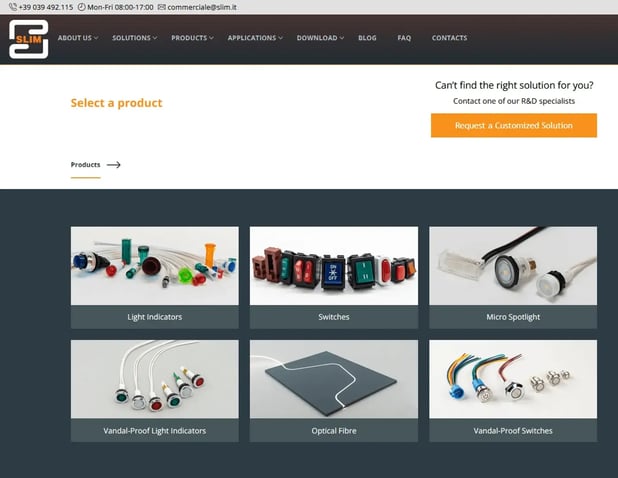
The first step is to select the product category you want to work with. SLIM offers six main families, all fully configurable:
| Category | Ideal for | Main configurable options |
|
Light indicators |
Home appliances, HoReCa, HVAC |
LED color, voltage, mounting type, lamp type |
|
Switches |
Control panels, industrial machinery |
Actuation type, shape, connection |
|
Micro Spotlights |
Accent lighting, design applications |
Lens, color temperature, orientation |
|
Vandal-Proof Light Indicators |
Public devices, vending machines, transport |
IP rating, material, color, voltage |
|
Vandal-Proof Switches |
Outdoor or industrial applications |
Button type, material, connection |
|
Optical Fibre |
Point lighting, compact spaces |
Length, diameter, termination |
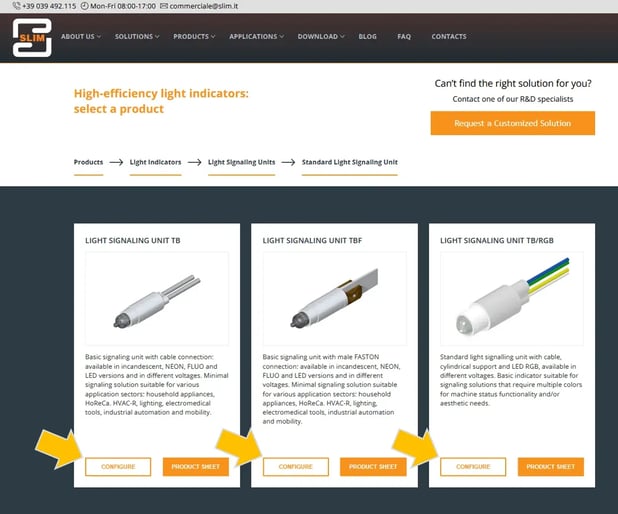
Once you’ve identified the right category, navigate to the product that interests you and open its page. Click “Configure” to access the interactive panel and start personalizing your solution.
2. Set the technical specifications
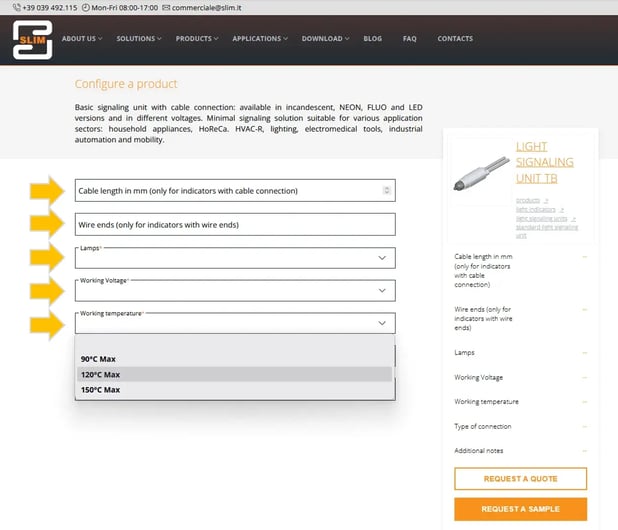
In this phase, you can define your product’s features in detail:
- type of lamp or LED,
- voltage and power supply,
- color temperature,
- connection type,
- any accessories or additional notes.
The configurator guides you step by step, showing only compatible options. This helps you reduce selection errors and generate a consistent technical sheet, ready for the SLIM team to review.
3. Send your request
Once your configuration is complete, you can choose to:
- receive a free quote,
- request a sample to test the product.
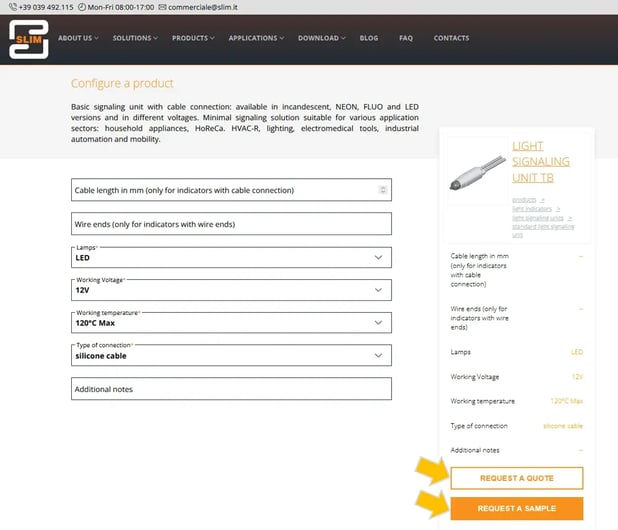
After you submit your request, you’ll receive an automatic confirmation and be contacted by the SLIM team to review the technical accuracy of your configuration or suggest any possible optimizations.
Each parameter you set helps the SLIM team provide a product perfectly suited to your project.
Get the most out of the configurator
To get accurate results and minimize response times, it helps to prepare some key technical details of your project in advance. Keep handy information such as:
- power supply voltage,
- environmental conditions of use,
- mounting type or space constraints,
- desired color temperature,
- aesthetic characteristics of the final product.
These details allow the configurator to generate a consistent proposal and help the SLIM team quickly evaluate the most suitable solution, avoiding errors or incomplete requests.
Another advantage is the ability to create multiple configurations to compare different variants, materials, or technical parameters. You can save your preferred options and request several quotes in parallel, helping you make the most accurate choice
Why use the SLIM configurator
The SLIM Configurator was created to make life easier for anyone who needs to select technical lighting components quickly, precisely, and safely. In environments where specifications matter and margins for error are minimal, relying on a dependable tool means saving time, avoiding mistakes, and speeding up every stage of the design or procurement process.
The configurator combines the simplicity of a guided workflow with the reliability of expert technical support. You can explore all available variants, check parameter compatibility in real time, and get a complete summary of your configuration ready to be reviewed or validated by the SLIM team.
Thanks to this approach, you can:
- Reduce selection time with an intuitive interface and optimized paths.
- Avoid compatibility errors, since the system only shows technically correct combinations
- Receive direct technical support,with a team that reviews and validates each configuration before sending your quote.
- Get a free quote or a sample quickly, so you can test the product directly in your operational environment.
In a market where component performance and reliability are essential, having a precise and intuitive configuration tool isn’t just an advantage, it’s a strategic choice.
Don’t waste time browsing catalogs and codes

Frequently Asked Questions about the SLIM Configurator
How can I request a quote from the SLIM Configurator?
After completing your configuration, click “Request a quote”, you’ll immediately receive an automatic confirmation and, shortly after, a direct follow-up from the SLIM team to review your request and provide the most suitable offer.
Can I order a sample of the configured products?
Yes. Once your configuration is complete, select “Request a sample.” It’s the best way to test the product under real operating conditions before placing your final order.
Do I need to register to use the configurator?
No registration is required. You can freely access the configurator from the Product Catalog and submit your request in just a few minutes, no account needed
How long does it take to receive the quote?
The SLIM team usually replies within a few working days, providing a technical evaluation and a personalized offer based on the parameters you selected.
Can I configure multiple products within the same project?
Absolutely. You can create and submit multiple configurations to compare different solutions or receive separate quotes. Each configuration is reviewed individually to ensure maximum technical accuracy.
The SLIM Configurator is the fastest and most precise way to create your custom lighting solution with direct technical support and a free quote in just a few clicks.